Revolutionizing Warehouse Logistics: The Power of PLC Automation in Modern Racking Systems
With economic growth in some countries and regions, warehouses and logistics hubs are under pressure to become more efficient. But since human working hours and efficiency are fixed, we need to automate some of the simpler tasks.
However, to achieve this, we can't do without a crucial component: PLC automation.
Perhaps you're not familiar with PLC automation or how to use it. If so, the following information might help you. So let's keep reading!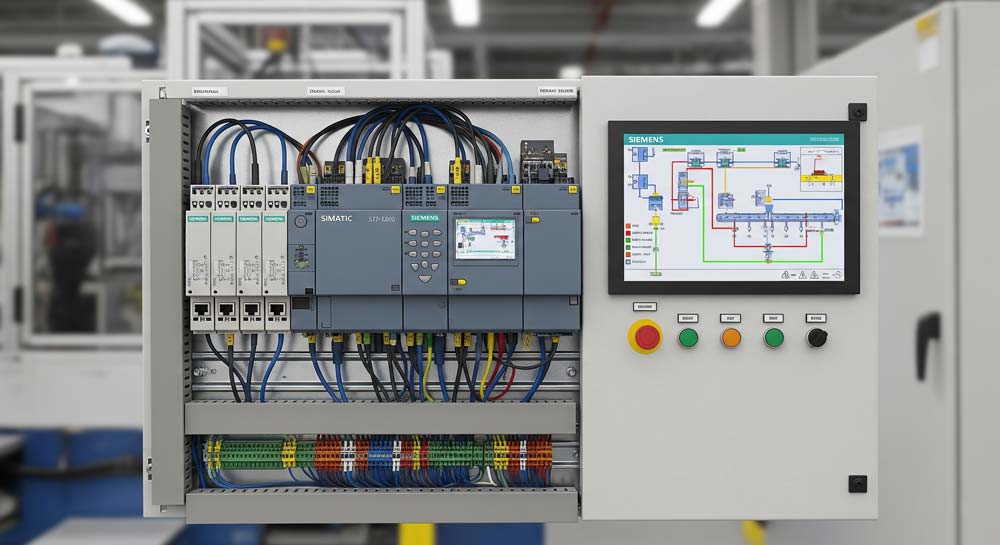
What is PLC automation?
Put simply, PLC automation uses a "small computer" called a PLC (Programmable Logic Controller) to control and manage your warehouse equipment, allowing it to act like a coordinated team and automatically complete various tasks.
Imagine you're a warehouse manager. You need to direct forklifts, conveyor belts, and robotic arms to move goods from point A to point B, and then from B to C. This process can be complex, requiring you to constantly give orders. If you get tired or make a mistake, the entire workflow can fall apart.
A PLC, on the other hand, is like a tireless, flawless super-manager. Once it's set up correctly, it can work continuously for as long as needed.
What are the components of PLC automation?
A PLC is not just a single computer or a set of programs; it has three main components. We can think of them as the "hands and feet," "brain," and "nerves" of the system.
Inputs:
This part acts as the PLC's "eyes" and "ears," gathering information from the outside world. For example, sensors (like photoelectric, weight, or proximity sensors) are like eyes that detect when a package arrives or how much it weighs. Buttons and switches are like ears that listen for commands from an operator. All the information gathered by these devices is sent to the PLC as electrical signals.
Central Processing Unit (CPU):
This is the PLC's "brain." It processes all the information and makes decisions. The CPU analyzes the signals from the input modules based on a pre-written program (the "instruction manual"). For example, it might decide: "Okay, the weight sensor says this box is over 10 kg, and the program says it should be sent to the heavy goods area."
Outputs:
This part is the PLC's "hands and feet." It receives instructions from the brain (the CPU) and then controls the actual working equipment. This includes things like motors (to make a conveyor belt move), solenoid valves (to open or close a robotic arm's gripper), or indicator lights (to show the equipment's status). Once the CPU makes a decision, the output module sends an electrical signal to drive these devices to perform the corresponding action.
How does PLC automation work?
We can describe its work with a simple, cyclical process that repeats continuously:
- Gather Information (Scan Inputs): The PLC first quickly checks all the devices connected to its input modules for any new signals. For instance, it checks if a button has been pressed or if a sensor has detected an item.
- Process Information (Execute Program): The PLC's brain (CPU) receives this information and begins to execute the program we wrote. It reads the program line by line, making logical decisions based on the current status of the input signals.
- Send Instructions (Update Outputs): Based on the program's results, the PLC updates the status of its output modules. For example, if the program decides a motor needs to be started, it sends a start signal to the motor.
- Repeat Loop: The PLC repeats these three steps at an extremely high speed (usually in milliseconds). It's like an incredibly efficient perpetual motion machine, constantly "seeing, thinking, and doing" to ensure the entire automation system runs smoothly and accurately.
Why is PLC automation important for warehouses?
As modernization progresses, the need for increased warehouse efficiency grows, and to achieve higher operational efficiency, PLC automation has become indispensable.
If you're still skeptical, take a look at the reasons I'm about to give you.
Increased Efficiency and Speed:
PLCs can control equipment to operate at incredibly high speeds and with great precision, far exceeding manual capabilities. For instance, an automatic sorting system can sort hundreds or thousands of packages per minute, significantly reducing order processing time.
Reduced Costs:
Automation systems decrease the reliance on human labor, which lowers personnel costs. At the same time, PLCs can precisely control equipment, reducing material waste and equipment wear and tear.
Improved Accuracy and Reliability:
A PLC strictly follows its program, and it doesn't get tired or make mistakes. This significantly reduces the likelihood of sorting errors and damaged goods. Its reliability is far superior to manual operations.
Enhanced Safety:
PLCs can be integrated with various safety devices (such as emergency stop buttons and safety light curtains). When a dangerous situation is detected, the PLC can immediately stop the equipment, protecting workers.
Ease of Management and Adjustment:
If a warehouse process changes, we just need to modify the program inside the PLC instead of rearranging the entire physical system. This makes the system very flexible and adaptable.
What types of warehouses are suitable for PLC automation?
This is a very practical question. While PLC automation is powerful, it's not suitable for every type of warehouse. Just as we wouldn't use a heavy-duty forklift to move a small package, choosing an automation solution requires considering costs and actual needs.
Generally, the following types of warehouse environments and situations are most suitable for introducing PLC automation:
Warehouses with High Repetition and Fixed Processes
If your warehouse has a lot of repetitive, single-task jobs, such as: Sorting a large number of packages every day. Moving goods along fixed routes between different areas. Packaging processes that are identical for various products. These tasks are not only inefficient with manual labor but also prone to errors. A PLC automation system, once its program is set, can perform these tasks tirelessly, with high precision and speed.
Warehouses that Handle a Large Volume of Goods
If your warehouse has a huge daily throughput, such as an e-commerce sorting center or a large manufacturing company's raw materials warehouse, manual operations are almost impossible to keep up with.
- High Throughput: A PLC-controlled automated sorting system can process hundreds or thousands of packages per minute—a speed that is unattainable with manual labor.
- 24/7 Operation: PLC automation systems can operate around the clock, significantly boosting the warehouse's overall processing capacity.
Warehouses with Extremely High Accuracy Requirements
In certain industries, like pharmaceuticals or high-tech electronics, the sorting, packaging, and tracking of goods require zero errors.
Precise Control: A PLC can precisely control the speed and position of robotic arms and conveyor belts, ensuring every step is accurate.
Data Traceability: A PLC can be integrated with sensors and computer systems to record real-time processing information for each item, making it easy to trace data and manage it later.
Warehouses with Harsh Environments or High Safety Requirements
Some warehouse environments are not suitable for long-term human work, such as: Low-temperature cold storage. High-temperature or hazardous material warehouses. Heavy-duty goods handling.
How to get started with PLC automation?
I'll assume you're a complete beginner with no prior experience in PLC automation. I'll outline a step-by-step "starter guide" to help you get started without feeling overwhelmed.
Step 1: Clarify your needs and pain points.
Before you start any technical setup, you need to think like a project manager. Automation isn't about showing off; it's about solving a problem. What problem do you want to solve? For example, is your sorting efficiency too low? Are manual transfers prone to errors? Do you want to speed up inventory counts? What do you most want to gain from automation? For instance, is it to reduce labor costs, decrease the error rate, or increase overall throughput?
My suggestion: Don't try to build a fully automated super-warehouse from the start. Begin with the simplest, most urgent area that needs improvement, such as automatic conveying or automatic counting. This approach involves less investment and risk, and a successful first project can give you a huge sense of accomplishment.
Step 2: Choose the right equipment and partners.
A PLC automation system consists of both hardware and software, and choosing the right equipment is crucial.
- PLC Brand Selection: There are many PLC brands on the market, such as Siemens, Rockwell, and Mitsubishi. For beginners, it's a good idea to choose a brand that has abundant resources, good community support, and a reasonable price. You can start by researching their entry-level products.
- Sensors and Actuators: Based on the needs you identified in step one, select the appropriate "eyes" and "hands."
For example, if you want to automate conveying, you'll need a photoelectric sensor to detect items and a motor to drive the conveyor belt. - Find a Professional Integrator: If you have no technical background, the best approach is to find a reliable automation integrator or technical company. Tell them your needs, and let them provide a complete solution. They will handle the programming, installation, and commissioning, and they can provide ongoing maintenance.
My suggestion: When choosing an integrator, compare a few different companies. Look at their past projects and make sure they are willing to provide support and guidance as you learn.
Step 3: Start with a small project and gradually expand.
This is the most critical step.
Project 1: A Simple Automatic Counting System Goal:
Install a sensor at your warehouse entrance to automatically count items as they pass by.
- Required Equipment: One PLC, one photoelectric sensor, one button (to reset the count), and one screen (to display the count).
- Key Learning Points: Wiring: Learn how to correctly connect the sensor, button, and screen to the PLC's input and output terminals.
- Programming: Learn the basics of Ladder Diagram programming and write a simple counting program.
For example: when the sensor detects a signal, the counter adds one. When the reset button is pressed, the counter resets to zero. Once you successfully complete this project, you'll have a hands-on understanding of PLC automation. You'll know how to wire, program, and debug.
Project 2: A Simple Automatic Conveying System Goal:
When an item is on the conveyor belt, the belt automatically runs; when the item reaches the end, it automatically stops.
- Required Equipment: One PLC, two photoelectric sensors, one motor, and one relay (to control the motor).
- Key Learning Points:
- Logic Control: Learn how to use the PLC's logic instructions to make conditional judgments. For example: IF the "start" sensor has a signal AND the "stop" sensor has no signal, THEN start the motor.
- Timing Control: You can also try adding a timer to keep the motor running for an extra two seconds before stopping to ensure the item has fully moved off the belt.
What are the common challenges of starting PLC automation?
This is a very common question and the one most beginners are concerned about when considering PLC automation. If you have no prior experience, the most immediate and common challenges you'll face are the following three:
High Initial Investment: This is the most obvious challenge. The initial cost of an automation system—from hardware (PLC, sensors, actuators, etc.) and software to professional programming and installation services—is very high. For individuals or small businesses with limited budgets, this can be a significant financial burden.
Steep Technical Barrier: PLC automation involves knowledge from multiple disciplines, including electrical engineering, mechanics, control theory, and programming. For a beginner, learning and mastering all this from scratch is a long and difficult process. Without a professional engineer or technical support, a problem with the system can be very tricky to resolve.
Difficult System Maintenance and Troubleshooting: Automation systems are made up of complex hardware and software. After some time, equipment may experience wear and tear, or the system might shut down due to a minor programming error. For a beginner, troubleshooting and solving these problems can be very time-consuming, possibly even requiring external experts.
My suggestion is: Before you start, you must clearly define your needs and budget, as I mentioned in the previous section: don't blindly pursue full automation. Start with a project that has a lower cost and a lower technical difficulty, such as the automatic counting system we discussed. This will allow you to gradually learn and gain experience, see tangible returns on your investment, and lay the groundwork for larger-scale automation projects in the future.
Conclusion
This article has come to an end. My main goal was to explain PLC automation in a simple and accessible way, hoping to help beginners who are interested in it get a quick understanding.
If you want to implement this kind of system in your warehouse but are truly a beginner, I highly recommend finding a professional team to help you. The type of goods and specific needs vary for every warehouse, and a customized design and plan are essential for success.