What Is Sap Warehouse Management
Today we are not going to talk about warehouse racking, let's talk about sap warehouse management.If you are new to it, you may have a lot of questions.
What is sap warehouse management and what does it really do? Is it important? And so on.
So what I am going to write is to answer your questions about sap warehouse management, so what are you waiting for? Let's get started!
What is sap warehouse management?
Before understanding SAP Warehouse Management, it is essential to first comprehend what SAP represents within this context.
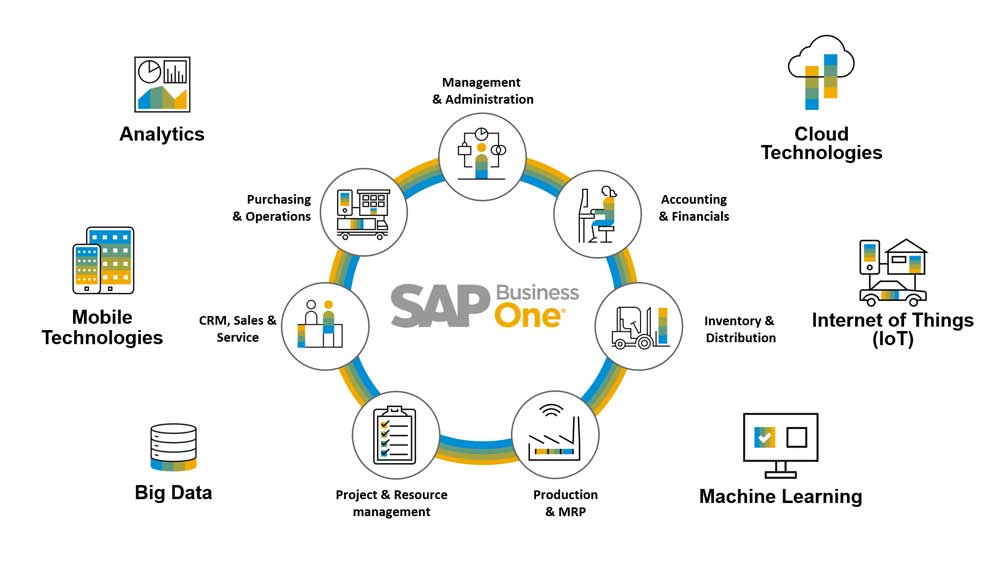
What is SAP?
SAP (Systems, Applications & Products in Data Processing) was founded in 1972 by five German engineers with the aim of digitizing business processes for enterprises. Initially, the SAP system focused predominantly on financial and accounting modules, but over time, it expanded into other domains such as production, sales, and logistics.
The Emergence of SAP Warehouse Management
By the 1980s, as enterprises grew in scale and globalization advanced, warehouse management became increasingly complex. Companies required efficient methods to manage inventory, optimize warehouse layouts, and reduce costs. Traditional paper-based records and manual operations were no longer sufficient, leading to escalating issues of inaccuracies and inefficiencies.
To address these challenges, in the 1990s, SAP introduced the Warehouse Management (WM) module as part of the SAP R/3 system. The objective of SAP WM was to streamline warehouse operations through digitization and automation, enhancing inventory accuracy and operational efficiency.
The Evolution of SAP Warehouse Management
As time progressed into the 2000s, SAP WM evolved further to support more sophisticated warehouse operations, including batch management, serial number management, and the First-In, First-Out (FIFO) strategy.
In the 2010s, with technological advancements, SAP WM began integrating with SAP Extended Warehouse Management (EWM), enabling advanced functionalities such as robotic automation, the Internet of Things (IoT), and real-time data analytics.
In the 2020s, SAP WM continued its transformation by migrating to the cloud and integrating with SAP S/4HANA, offering businesses more adaptable and intelligent warehouse management solutions.
Comprehensive Analysis of SAP Warehouse Management Fundamentals
Definition and Core Principles:
Definition:
SAP Warehouse Management (WM) is a specialized module within the SAP system designed to manage warehouse operations and inventory. It employs digitalization, automation, and real-time processes to help businesses optimize warehouse layouts, enhance inventory accuracy, and improve operational efficiency.
Core Principles:
- Efficiency: Streamline processes and enhance automation to reduce the time and costs associated with warehouse operations.
- Accuracy: Ensure real-time and precise inventory data to minimize errors.
- Visibility: Provide real-time data on inventory and warehouse operations to facilitate informed decision-making.
- Flexibility: Support various warehouse operation modes (e.g., First-In-First-Out, batch management) and complex logistics needs.
Basic Concepts and Functions of SAP WM:
Basic Concepts:
- Storage Unit: The unit in which goods are stored in the warehouse, such as pallets or cartons.
- Storage Type: The classification of different areas within the warehouse, such as shelving, picking, or temporary storage areas.
- Storage Bin: The smallest storage location within the warehouse, used to specify the exact placement of goods.
- Goods Movement: The movement of goods within and outside the warehouse, including receiving, shipping, and transferring.
Core Functions:
- Inventory Management: Real-time tracking of inventory quantities and locations.
- Warehouse Layout Optimization: Suggest optimal storage locations for goods to reduce picking time.
- Task Management: Generate and allocate warehouse tasks such as picking and put-away.
- Batch and Serial Number Management: Track goods by specific batches or serial numbers.
- First-In-First-Out (FIFO): Ensure inventory flows according to the FIFO principle.
- Inventory Counting: Support periodic or real-time inventory counts to ensure data accuracy.
Core Modules and Operational Mechanics:
Core Modules:
- Inventory Management (IM): Manage the quantity and status of inventory.
- Warehouse Management (WM): Optimize warehouse operations and layouts.
- Task and Resource Management: Allocate and monitor warehouse tasks.
- Batch Management: Track goods by specific batches.
- Serial Number Management: Track goods by specific serial numbers.
Operational Mechanics:
- Data Entry: Input goods information into the system via scanning devices or manual entry.
- Task Generation: Automatically generate warehouse tasks based on requirements such as orders or replenishment.
- Task Execution: Warehouse staff execute specific tasks (e.g., picking, put-away) as per system instructions.
- Data Update: Automatically update inventory and location information upon task completion.
- Monitoring and Analysis: Monitor warehouse operations and analyze efficiency through real-time data to suggest optimization strategies.
The Role of SAP WM in Supply Chain Management:
Role in the Supply Chain:
- Critical Junction: Warehouses serve as critical junctions connecting suppliers, manufacturers, and customers.
- Inventory Hub: Warehouse management directly impacts inventory availability and delivery speed.
- Cost Control: Efficient warehouse management can reduce inventory holding and logistics costs.
Enhancing Supply Chain Efficiency:
- Reducing Lead Times: Optimize warehouse operations to expedite order processing.
- Minimizing Stockpiles: Use real-time monitoring to avoid overstocking or stockouts.
- Improving Order Accuracy: Reduce erroneous orders and enhance customer satisfaction.
Synergistic Effects of SAP WM with Other SAP Modules:
Integration with SAP ERP:
- Material Management (MM): Synchronize inventory data in real-time to support procurement and demand planning.
- Sales and Distribution (SD): Facilitate order fulfillment and shipping processes.
- Production Planning (PP): Ensure raw material availability to support Just-In-Time (JIT) production.
Integration with SAP SCM:
- Demand Planning: Optimize inventory levels based on demand forecasts.
- Transportation Management: Coordinate inbound and outbound goods with transportation schedules.
- Supply Chain Monitoring: Provide real-time warehouse data to support supply chain decisions.
Relationship with SAP Extended Warehouse Management (EWM):
- Advanced Features: EWM offers more sophisticated warehouse management features, such as robotic automation and complex wave management.
- Upgrade Path: SAP WM can be progressively upgraded to EWM to support more complex warehouse operations.
Key Functions and Features of SAP Warehouse Management
Key Functions of SAP WM:
1. Inventory Management
Function: Real-time tracking of inventory quantity, location, and status.
Features:
- Supports multi-warehouse management, ideal for globally distributed enterprises.
- Provides real-time inventory data to prevent overstocking or shortages.
- Enables batch and serial number management for traceability.
2. Warehouse Layout Optimization
Function: Optimizes warehouse layout and storage locations to enhance operational efficiency.
Features:
- Recommends optimal storage positions based on product characteristics (e.g., size, weight, demand frequency).
- Reduces picking routes and shortens operational time.
- Supports multiple storage types (e.g., shelving, picking, staging areas).
3. Task Management
Function: Automates the generation and allocation of warehouse tasks (e.g., picking, putaway).
Features:
- Assigns tasks based on order priority and inventory location.
- Facilitates multi-user collaboration to improve task execution efficiency.
- Monitors task status to ensure timely completion.
4. Batch and Serial Number Management
Function: Tracks specific batches or serial numbers of goods.
Features:
- Supports FIFO (First-In-First-Out) and FILO (First-In-Last-Out) strategies.
- Ensures traceability to meet industry compliance (e.g., pharmaceuticals, food).
- Generates detailed batch and serial number reports.
5. Inventory Counting
Function: Facilitates periodic or real-time stocktaking to ensure inventory accuracy.
Features:
- Supports various counting methods (e.g., cycle counting, random counting).
- Automates counting tasks, minimizing manual intervention.
- Automatically reconciles discrepancies and generates adjustment recommendations.
6. Goods Movement Management
Function: Manages internal and external goods movements (e.g., receipts, shipments, transfers).
Features:
- Automates movement document creation to streamline processes.
- Supports multiple movement types (e.g., inter-warehouse transfers, internal transfers).
- Integrates with transportation management for optimized logistics.
7. Wave Management
Function: Consolidates multiple orders into waves to optimize picking processes.
Features:
- Generates waves based on order characteristics (e.g., destination, product type).
- Enables batch picking for increased efficiency.
- Reduces logistics costs both within and outside the warehouse.
8. Quality Management
Function: Integrates quality control processes into warehouse operations.
Features:
- Facilitates quality inspections during goods receipt to ensure compliance.
- Provides detailed inspection reports and issue logs.
- Seamlessly integrates with the SAP QM (Quality Management) module.
Key Features of SAP WM:
1. High Automation
Reduces manual intervention through automated task allocation, movement document creation, and inventory updates.
Integrates with automated equipment (e.g., scanners, robots) to further reduce labor costs.
2. Real-Time Data Visibility
Offers real-time inventory data and warehouse operation status for swift response to demand changes.
Provides comprehensive warehouse operation analysis via dashboards and reports.
3. Flexibility and Scalability
Supports diverse warehouse operation modes and complex logistics requirements.
Suitable for businesses of all sizes, from small warehouses to large logistics hubs.
4. Seamless Integration with SAP Modules
Integrates tightly with SAP ERP (e.g., MM, SD, PP), SCM, and EWM modules for end-to-end process optimization.
Supports interfaces with third-party systems for seamless data flow.
5. Support for Complex Business Scenarios
Handles global demands such as multi-language, multi-currency, and multi-tax systems.
Manages complex scenarios like batch, serial number, and quality management.
6. Enhanced Customer Satisfaction
Improves order fulfillment speed and accuracy, reducing delivery times and enhancing customer experience.
Minimizes inventory overstocking and shortages, ensuring supply chain stability.
Comparative Analysis of SAP WM and SAP Extended Warehouse Management (EWM)
Definition and Scope:
SAP WM:
Definition: SAP WM (Warehouse Management) is an integrated module within the SAP ERP system, primarily supporting basic warehouse operations and inventory management.
Scope: Suitable for small-to-medium enterprises or large enterprises with relatively straightforward processes, fulfilling essential warehouse management needs.
SAP EWM:
Definition: SAP EWM (Extended Warehouse Management) is a standalone warehouse management system offering advanced functionalities to support complex warehouse operations and automation.
Scope: Ideal for large enterprises or those requiring intricate warehouse operations, especially those needing high automation and flexibility in logistics centers.
Functional Comparison:
Technical Architecture Comparison:
Applicable Scenarios:
SAP WM Scenarios:
- Warehouse operations are relatively simple, without the need for advanced automation.
- Smaller warehouse sizes with standardized processes and limited budgets.
- Enterprises are already using SAP ERP, seeking seamless warehouse management integration to avoid additional system costs.
SAP EWM Scenarios:
- Warehouse operations are complex, requiring support for multi-warehouse, multi-tier, and automated equipment.
- Large warehouse sizes with diverse processes and a need for high flexibility and scalability.
- Enterprises needing real-time monitoring, advanced analytics, and visual dashboards to optimize warehouse operations.
- Enterprises transitioning to SAP S/4HANA or planning to adopt cloud-based solutions.
Cost and Implementation Comparison:
Selection Recommendations:
Choose SAP WM When:
- Warehouse management needs are basic.
- Budgets are limited, and quick implementation is desired.
- The enterprise already uses SAP ERP and seeks seamless integration of warehouse functions.
Choose SAP EWM When:
- Warehouse operations are complex, requiring advanced functionalities (e.g., automation, real-time monitoring).
- The enterprise is large with diversified business processes.
- There are plans to migrate to SAP S/4HANA or adopt cloud-based solutions.
Technical Architecture and Implementation Recommendations for SAP WM
Technical Architecture of SAP WM
SAP WM is an integrated module within the SAP ERP system, making its technical architecture closely related to other SAP ERP modules. The key aspects of its technical architecture include:
Core Components
Database Layer
- Utilizes the underlying database of SAP ERP (such as SAP HANA or other supported databases) to store all warehouse management-related data.
- Supports real-time data updates and queries, ensuring inventory accuracy and warehouse operations efficiency.
Application Layer
- SAP WM is tightly integrated with other SAP ERP modules, such as MM (Materials Management), SD (Sales and Distribution), and PP (Production Planning).
- Provides core warehouse management functionalities, including inventory management, task allocation, and goods movement.
Presentation Layer
- Offers user interfaces through SAP GUI (Graphical User Interface) or SAP Fiori.
- Supports integration with mobile devices (such as barcode scanners and tablets) for on-site operations.
Integration Layer
- Seamlessly integrates with other SAP ERP modules like MM, SD, and PP.
- Supports interfaces with external systems, such as third-party logistics (3PL) systems and automated equipment.
Implementation Recommendations for SAP WM
Implementing SAP WM requires comprehensive planning from business requirements, technical environment, and project management perspectives. The following are key recommendations for implementation:
(1) Project Planning Phase
Define Business Requirements
- Analyze the enterprise's warehouse management needs and identify core functionalities (such as inventory management, task allocation, and quality control).
- Determine whether integration with other SAP ERP modules (e.g., MM, SD) is required.
Establish Project Objectives
- Define key success indicators (KPIs), such as inventory accuracy, order processing time, and cost savings.
- Set the project scope and priorities to prevent scope creep.
Form a Project Team
- Include business users, IT teams, SAP consultants, and project managers.
- Ensure team members have expertise in SAP WM and relevant business domains.
(2) System Design Phase
Warehouse Layout Design
- Design the warehouse layout based on business needs, defining storage types (e.g., racking area, picking area) and storage locations.
- Optimize the placement of goods to minimize picking paths and time.
Process Design
- Define warehouse operation processes (such as receiving, shipping, and transfer).
- Establish batch and serial number management strategies (e.g., FIFO, LIFO).
Data Migration and Testing
- Prepare master data (such as storage types, storage locations, and product information).
- Conduct data migration testing to ensure data integrity and accuracy.
(3) System Configuration and Development Phase
Configure SAP WM Module
- Set up core warehouse management functions (such as inventory management, task allocation, and goods movement).
- Configure integration points with other SAP ERP modules (e.g., MM, SD).
Develop Custom Enhancements
- Develop customized functionalities or interfaces based on business needs.
- Optimize the user interface to enhance operational efficiency.
(4) Testing and Training Phase
Functional Testing
- Test all warehouse management functionalities to ensure they meet business requirements.
- Validate integration points with other modules to ensure seamless data flow.
User Training
- Provide comprehensive training to ensure business users can effectively operate SAP WM.
- Offer user manuals and training materials for ongoing learning and reference.
(5) Go-Live and Support Phase
Go-Live Planning
- Develop a detailed go-live plan, including data migration, user training, and system transition.
- Ensure business continuity during the go-live period.
Post-Go-Live Support
- Provide technical support to resolve user issues and system failures.
- Continuously monitor system performance and optimize functionalities.
Key Success Factors in Implementation
- Business Involvement: Ensure business users are engaged throughout the process to provide accurate business requirements and feedback.
- Data Quality: Maintain accurate and complete master data, as it is fundamental to system success.
- Change Management: Implement an effective change management plan to minimize disruptions caused by the new system.
- Training Support: Provide adequate training to ensure users can proficiently use the system.
- Continuous Optimization: Continuously improve the system and processes based on business needs and technological advancements.
Future Trends and Development Prospects
Future Trends of SAP WM
(1) Migration to SAP Extended Warehouse Management (EWM)
- Background: As enterprises' warehouse management needs become increasingly complex, the basic functions of SAP WM can no longer meet the demands for high automation and flexibility.
- Trend: Many enterprises are migrating from SAP WM to the more advanced SAP EWM, especially as SAP S/4HANA becomes the mainstream choice.
- Impact: While SAP WM may gradually phase out, it will still have a market presence in small and medium-sized enterprises (SMEs) and in scenarios with simpler business processes.
(2) Deep Integration with SAP S/4HANA
- Background: SAP S/4HANA is SAP's next-generation ERP system, offering higher performance and a more flexible architecture.
- Trend: SAP WM will be more deeply integrated with SAP S/4HANA, leveraging the real-time processing capabilities of the HANA database to enhance warehouse management efficiency and accuracy.
- Impact: Enterprises can achieve more efficient warehouse management and comprehensive supply chain optimization through SAP S/4HANA.
(3) Cloud Adoption and SaaS Model
- Background: Cloud computing is becoming the mainstream choice for enterprise IT architecture, and SAP has introduced cloud-based ERP solutions such as SAP S/4HANA Cloud.
- Trend: SAP WM may be offered as a SaaS (Software as a Service) solution, reducing deployment and maintenance costs for enterprises.
- Impact: Cloud adoption will make SAP WM easier to implement and scale, particularly for SMEs and global enterprises.
(4) Integration with IoT and Automation Technologies
- Background: IoT and automation technologies are transforming warehouse management through smart robots, automated storage systems, and sensors.
- Trend: SAP WM will integrate more deeply with IoT and automation technologies to enable smart and unmanned warehouse operations.
- Impact: By leveraging real-time data collection and analysis, enterprises can further optimize warehouse operations and reduce labor costs.
(5) Application of Artificial Intelligence and Machine Learning
- Background: AI and machine learning (ML) are increasingly being applied in supply chain and logistics management.
- Trend: SAP WM will incorporate AI and ML to forecast inventory demand, optimize warehouse layouts, and automate task allocation.
- Impact: The application of AI and ML will make warehouse management more intelligent, enabling enterprises to better respond to market demand changes.
(6) Optimization of User Experience
- Background: Modern enterprises place greater emphasis on user experience, including UI/UX design and workflow optimization.
- Trend: SAP WM will enhance its user interface by adopting modern designs such as SAP Fiori to improve usability.
- Impact: A more user-friendly interface and simplified workflows will enhance the efficiency and satisfaction of warehouse management personnel.
Development Prospects of SAP WM
(1) Continued Use in SMEs
- Prospect: For SMEs with relatively simple warehouse management needs, SAP WM remains a cost-effective option.
- Advantage: As an integrated module of SAP ERP, SAP WM is easy to implement and maintain, making it suitable for businesses with limited budgets.
(2) Complementary Relationship with SAP EWM
- Prospect: In certain scenarios, SAP WM and SAP EWM can complement each other. For example, enterprises may use SAP EWM for central warehouses while deploying SAP WM in branch warehouses.
- Advantage: This combination helps enterprises balance functionality and cost, achieving more flexible warehouse management.
(3) A Transitional Solution for SAP S/4HANA Migration
- Prospect: For enterprises not yet ready to migrate to SAP S/4HANA or SAP EWM, SAP WM can serve as a transitional solution.
- Advantage: By optimizing existing SAP WM systems, enterprises can prepare for future upgrades while minimizing migration risks.
(4) Industry-Specific Applications
- Prospect: SAP WM retains unique advantages in certain industries such as retail, distribution, and pharmaceuticals, particularly in batch management and inventory traceability.
- Advantage: SAP WM’s capabilities align with the compliance and traceability requirements of these industries.
Conclusion
After you read this article, I think you have a clear idea about sap warehouse management. If you have more questions or needs about warehouse racking and storage equipment, you are welcome to contact us, we look forward to hearing from you!